
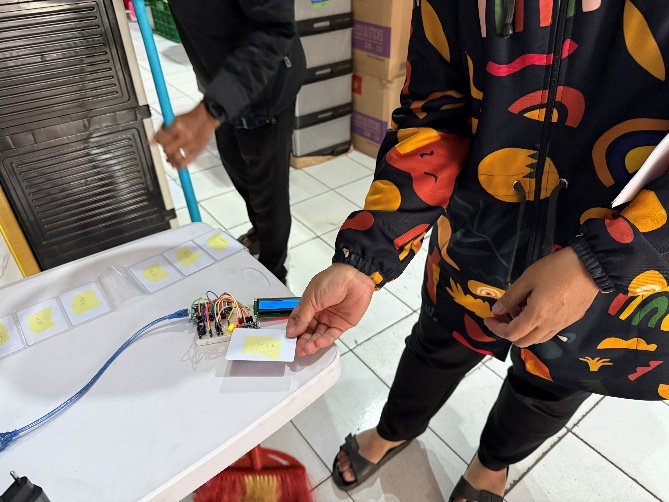
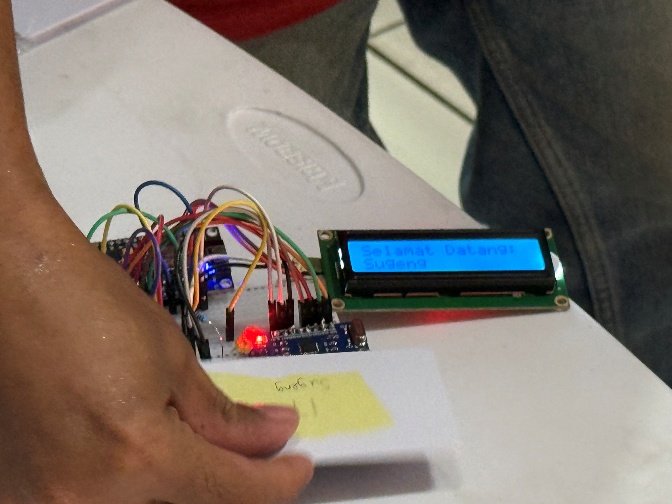
ISS berkesempatan membuat mesin absensi pegawai untuk owner dari sebuah toko UMKM di Bandung. Sistem dirancang untuk mudah dipakai sekalipun oleh pengguna yang sehari-hari tidak memakai komputer. Karena itu, mesin absen menggunakan kartu RFID karena sudah banyak dipakai di Indonesia dan harganya relatif terjangkau (misalnya, kartu e-toll atau e-KTP). Pengguna cukup menyentuhkan kartu di alat pendeteksi. Selain itu, hasil absen diunggah secara otomatis ke Google Sheet dan dapat dicek dari mana saja dengan sambungan internet. ISS は、バンドンにある中小企業の店舗オーナー向けに、従業員の勤怠管理機を制作する機会を得ました。本システムは、日常的にコンピューターを使用しない利用者でも簡単に使えるように設計されています。そのため、インドネシアですでに広く普及しており、価格も比較的手頃な RFID カード(例:e-toll カードや e-KTP)を採用しました。利用者はカードを検知装置にかざすだけで打刻できます。さらに、勤怠データは自動的に Google スプレッドシートへアップロードされ、インターネット接続があればどこからでも確認可能です。 ISS had the opportunity to build an employee attendance machine for the owner of an SME shop in Bandung. The system was designed to be easy to use even for people who don't use computers in their daily work. That's why the attendance machine uses RFID cards — already widely used in Indonesia and relatively affordable (for example, e-toll or e-KTP cards). Users simply tap their card on the reader. Attendance results are also automatically uploaded to Google Sheets and can be checked from anywhere with an internet connection.
Perangkat yang Digunakan 使用した機器 Devices Used
- ESP8266
- LCD 16x2 (I2C)LCD 16×2(I2C)16x2 LCD (I2C)
- MFRC-522
- Kartu RFID Mifare 1KBRFID カード(Mifare 1KB)Mifare 1KB RFID card
- Resistor dan LED抵抗および LEDResistor and LED
- BuzzerブザーBuzzer
Skema Rangkaian dan Penjelasan 回路図と説明 Circuit Schematic & Explanation
Mikrokontroler ESP8266 digunakan dengan konfigurasi sebagai berikut: マイクロコントローラ ESP8266 は、以下の設定で使用しています。 The ESP8266 microcontroller is wired with the following configuration:
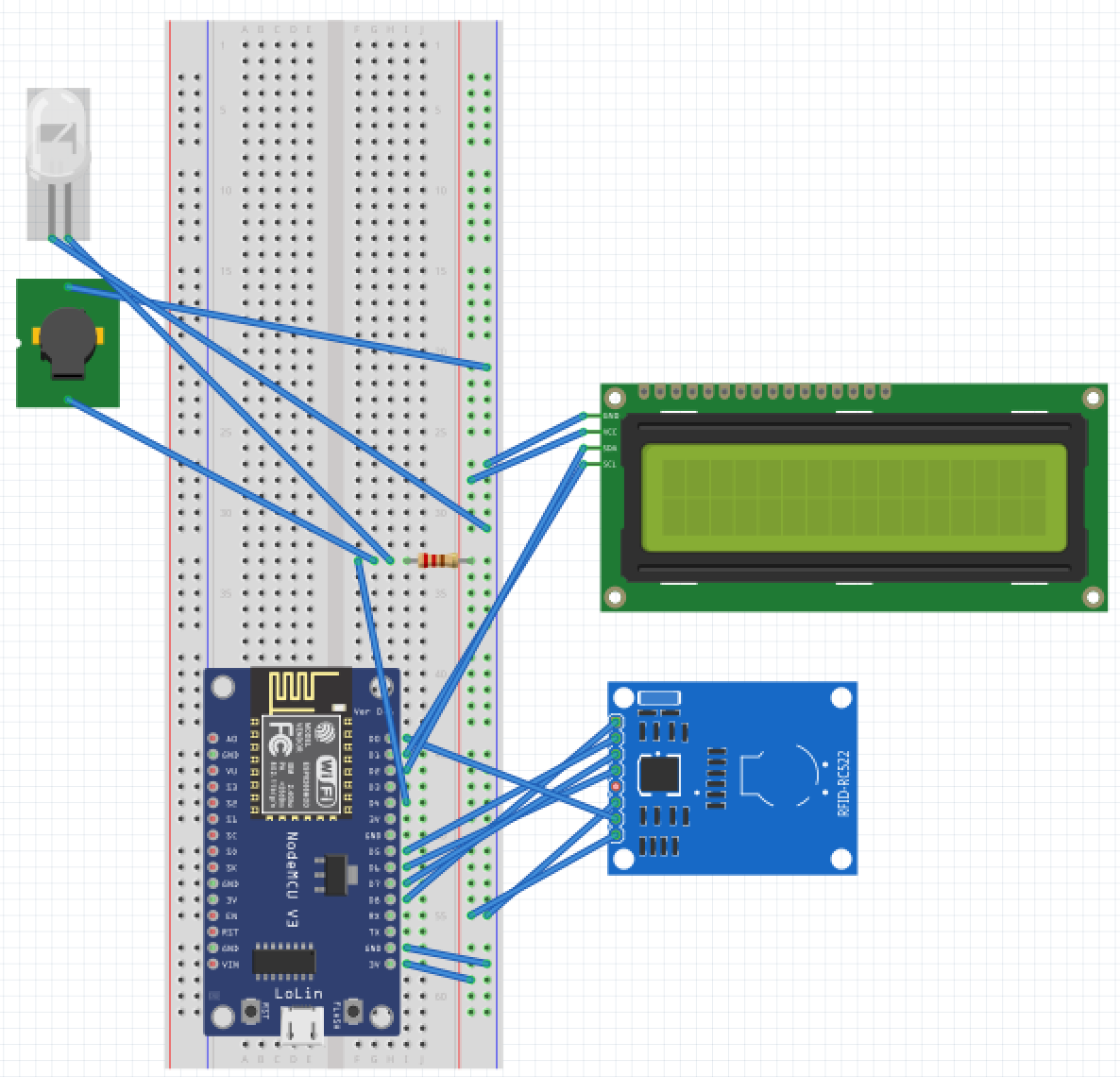
Resistor yang digunakan adalah pulled-up karena GPIO2 akan gagal boot saat pulled-low. Referensi: ESP8266 Pinout Reference: Which GPIO pins should you use? — Random Nerd Tutorials. 使用している抵抗はプルアップ抵抗です。GPIO2 はプルダウン状態になると起動に失敗するためです。参考:ESP8266 Pinout Reference: Which GPIO pins should you use? — Random Nerd Tutorials. The resistor used is a pull-up, since GPIO2 fails to boot when pulled low. Reference: ESP8266 Pinout Reference: Which GPIO pins should you use? — Random Nerd Tutorials.
Source Code ソースコード Source Code
Source code mesin absensi dapat diakses dari repository berikut: github.com/michaelandriwijaya/bima-attendance 勤怠管理機のソースコードは、以下のリポジトリから参照できます:github.com/michaelandriwijaya/bima-attendance Source code for the attendance machine is available at: github.com/michaelandriwijaya/bima-attendance
Code dibagi dalam 5 file: attendance.ino (file utama), attendance_buzzer_method (fungsi buzzer), attendance_rfid_method (fungsi RFID), attendance_wifi_method (fungsi Wi-Fi), attendance_gsheet_method (fungsi Google Sheet), dan attendance_time_method (fungsi waktu). Kelima file ini digabung otomatis saat dicompile (menggunakan Arduino IDE). コードは以下の5つのファイルに分かれています:attendance.ino(メインファイル)、attendance_buzzer_method(ブザー機能)、attendance_rfid_method(RFID機能)、attendance_wifi_method(Wi-Fi機能)、attendance_gsheet_method(Googleスプレッドシート機能)、attendance_time_method(時刻機能)。これらのファイルはコンパイル時に自動的に結合されます(Arduino IDE使用)。 The code is split across 5 files: attendance.ino (main file), attendance_buzzer_method (buzzer function), attendance_rfid_method (RFID function), attendance_wifi_method (Wi-Fi function), attendance_gsheet_method (Google Sheets function), and attendance_time_method (time function). These five files are merged automatically when compiled (using Arduino IDE).
Kesimpulan 結論 Conclusion
Mesin telah digunakan secara rutin tanpa kendala besar. Dari hasil pantauan, ada beberapa hal yang dapat diperbaiki untuk versi berikutnya: 本機は大きな問題もなく、日常的に使用されています。運用結果から、次のバージョンで改善できる点がいくつか見えてきました。 The machine has been used routinely without major issues. From observation, a few things could be improved in the next version:
- Waktu mengunggah sekitar 5 detik; saat koneksi Wi-Fi kurang baik, bisa mencapai 30 detik, membuat pengguna berikutnya menunggu. Mungkin dapat diperbaiki dengan background task menggunakan RTOS (real time operating system). アップロードに約5秒かかり、Wi-Fi接続が不安定な場合は最大30秒程度かかることがあり、次の利用者が待たされてしまいます。RTOS(リアルタイムオペレーティングシステム)を用いたバックグラウンドタスクで改善できる可能性があります。 Upload time is around 5 seconds; when the Wi-Fi connection is poor, it can take up to 30 seconds, making the next user wait. This could potentially be improved with a background task using an RTOS (real-time operating system).
- Saat mesin dinyalakan sebelum koneksi Wi-Fi tersambung, mesin tidak dapat menerima hasil absensi. Mungkin dapat diperbaiki dengan menyimpan hasil absensi sementara, yang diunggah setelah koneksi Wi-Fi tersambung. 機器起動時に Wi-Fi がまだ接続されていない場合、勤怠データを受け付けられません。Wi-Fi 接続が確立した後にアップロードできるよう、勤怠データを一時保存する仕組みで改善できると考えられます。 When the machine is powered on before the Wi-Fi connection is established, it can't record attendance. This could be improved by storing the result temporarily and uploading it once the Wi-Fi connection is restored.
Di ISS, kami dapat memberikan solusi kustom terhadap berbagai masalah teknologi Anda dengan menggunakan software, mikrokontroler, IoT, dan otomasi — untuk beragam skala bisnis UMKM. ISS では、ソフトウェア、マイクロコントローラ、IoT、オートメーションを活用し、さまざまな技術課題に対するカスタムソリューションを提供しています。中小企業を含む幅広いビジネス規模に対応可能です。 At ISS, we provide custom solutions for a range of technology needs using software, microcontrollers, IoT, and automation — for SME businesses of various scales.