
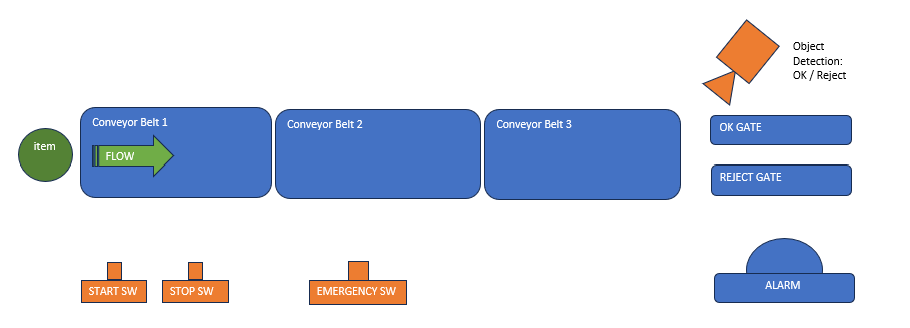
Kali ini, ISS mengerjakan simulasi mini factory yang dikontrol menggunakan OpenPLC dengan dashboard dari Node-RED. Alurnya: ketika tombol Start ditekan, conveyor belt bergerak memindahkan barang secara bergantian dari yang pertama hingga terakhir, dikendalikan oleh timer. Barang kemudian diperiksa apakah cacat atau tidak — barang layak dikumpulkan di satu gerbang, dipisahkan dari barang cacat di gerbang lainnya. Setiap barang dihitung (total, layak, dan cacat) sebagai pendataan. Apabila barang cacat melebihi jumlah tertentu, lampu alarm menyala. Selain tombol Start, tombol Stop dan Emergency (Reset) juga disediakan untuk situasi tidak terduga. 今回、ISSは OpenPLC で制御し、Node-RED のダッシュボードで可視化するミニファクトリーのシミュレーションを構築しました。シミュレーションの流れは次のとおりです。Start ボタンを押すと、コンベアベルトが稼働し、タイマー制御により製品が先頭から最後まで順番に搬送されます。その後、製品に欠陥があるかどうかを検査します。良品は一方のゲートに集められ、不良品は別のゲートに分離されます。各製品は(総数、良品数、不良品数)としてカウントされ、データとして記録されます。不良品の数が一定値を超えると、アラームランプが点灯します。Start ボタンに加えて、予期せぬ状況に対応するための Stop ボタンと Emergency(リセット)ボタンも用意されています。 This time, ISS built a mini factory simulation controlled by OpenPLC, with a dashboard from Node-RED. The flow: when the Start button is pressed, conveyor belts move items in turn from first to last, controlled by a timer. Each item is then checked for defects — good items are collected at one gate, defective ones separated at another. Every item is counted (total, good, and defective) as data. If defective items exceed a certain number, an alarm light turns on. Besides Start, Stop and Emergency (Reset) buttons are also provided for unexpected situations.
Untuk memudahkan pengamatan, dashboard visual juga dirancang sebagai HMI (Human-Machine Interface) menggunakan Node-RED yang tersambung ke PLC via Modbus TCP. Untuk simulasi deteksi barang, dapat digunakan random generator agar barang layak/cacat tercipta secara acak, namun kali ini penentuannya dilakukan manual lewat dashboard. Tampilan dashboard adalah sebagai berikut: 観察を容易にするため、Node-RED を用いて HMI(ヒューマン・マシン・インターフェース)としてのビジュアルダッシュボードも設計されています。このダッシュボードは Modbus TCP を介して PLC と接続されています。製品検出のシミュレーションにはランダムジェネレーターを使って良品/不良品をランダムに生成することも可能ですが、今回はダッシュボード上で手動設定する方式を採用しています。ダッシュボードの表示内容は以下のとおりです。 To make observation easier, a visual dashboard was also designed as an HMI (Human-Machine Interface) using Node-RED, connected to the PLC via Modbus TCP. Item-detection simulation could use a random generator to create good/defective items randomly, but this time the result was set manually via the dashboard. The dashboard looks like this:
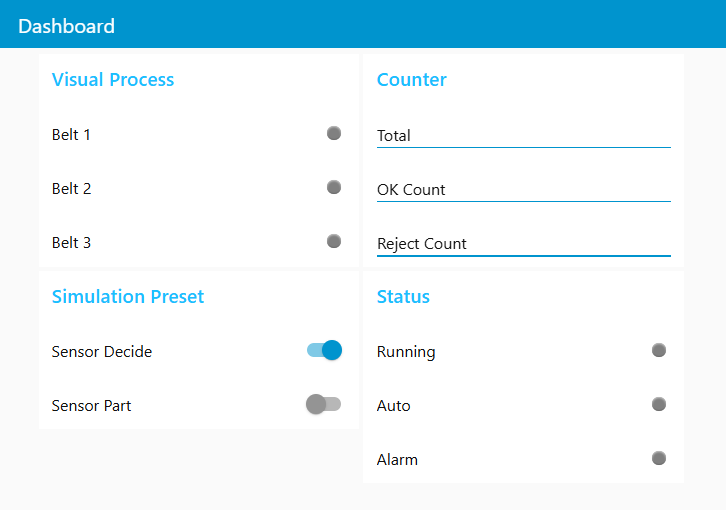
- Visual Process — setiap belt menyala hijau saat aktifVisual Process:各ベルトの状態を表示し、稼働中は緑色で点灯しますVisual Process — each belt lights up green when active
- Simulation Preset — menentukan hasil deteksi barang di belt terakhir; [Sensor Decide] aktif bila barang lolos deteksi, non-aktif bila reject; [Sensor Part] aktif bila objek terdeteksi sensor. Bagian ini disetel manual sebagai bagian dari simulasi.Simulation Preset:最終ベルト通過時の検出結果を設定します。[Sensor Decide] は合格品の場合に有効、不良品の場合は無効に設定します。[Sensor Part] はセンサーが対象物を検知した際に有効になります。このセクションはシミュレーションの一環として手動で設定されます。Simulation Preset — sets the detection result at the last belt; [Sensor Decide] is active if the item passes, inactive if rejected; [Sensor Part] activates when the sensor detects an object. This section is set manually as part of the simulation.
- Counter — jumlah barang yang terdeteksi, lolos, dan rejectCounter:検出された製品の総数、合格品数、不良品数を表示しますCounter — total items detected, passed, and rejected
- Status — status sistem saat ini: [Running] aktif saat sistem berjalan, [Auto] aktif saat berjalan otomatis, [Alarm] aktif saat jumlah reject melebihi batasStatus:現在のシステム状態を表示します。システム稼働中は [Running] が有効、自動運転時は [Auto] が有効、不良品数が設定値を超えた場合は [Alarm] が有効になりますStatus — current system status: [Running] active while the system runs, [Auto] active in automatic mode, [Alarm] active when rejects exceed the set limit
Kinerja sistem dapat dilihat dari video di bawah ini: システムの動作は以下の動画でご確認いただけます: System performance can be seen in the video below:
Di ISS, kami dapat memberikan solusi otomasi untuk manufaktur Anda menggunakan PLC dan Node-RED — untuk beragam skala bisnis dari UMKM hingga pabrik skala besar. ISSでは、PLC と Node-RED を活用した製造業向けオートメーションソリューションを提供しています。中小企業から大規模工場まで、さまざまなビジネス規模に対応可能です。 At ISS, we provide automation solutions for your manufacturing using PLC and Node-RED — for businesses ranging from SMEs to large-scale factories.